Challenges
Bring the magic of classic Decathlon offline events online

my role
p
team
Product & Design (Me)
Head of Technology
1 Frontend, 2 Backend, 1 QA
timeline
Q2 2025 – Q4 2025
(Pre-Seed)
problem context
Bringing the magic of Decathlon’s local sports events online!
Decathlon India ran a thriving offline sports community through its All for Sports app and local stores. Group runs, cycling events, walking clubs — organised by store managers called Omni Leaders. It worked because it had an infrastructure: a place to gather, a leader to show up, a badge at the finish line.
COVID removed the infrastructure overnight. But the community didn't disappear — it migrated to WhatsApp. Leaders started posting challenge targets, members submitted screenshots of their stats, and leaders manually tracked who completed what.
COVID removed the infrastructure overnight. But the community didn't disappear, it migrated to WhatsApp. Leaders started posting challenge targets, members submitted screenshots of their stats, and leaders manually tracked who completed what.
Why it is essential to solve?
Some hesitated to act even when the results were accurate
Most prompts expressed intent, not queries
Blank input fields left users unsure of what their data could do
Community didn't wait for a product.
It built its own workaround using WhatsApp groups!
The product question was never "how do we get people to exercise?" It was "how do we build infrastructure worthy of what they're already doing?"
real design problem
The product experience depends entirely on data it doesn't own.
Early in the process, the architecture decision was made: challenge tracking via third-party fitness APIs — Strava, Fitbit, Google Fit. Use what people already have. Smart call for adoption. Brutal constraint for trust.
The product now sat at the downstream end of a pipeline it didn't control. And every handoff in that pipeline was a point where the product could look broken — without anything actually being wrong.
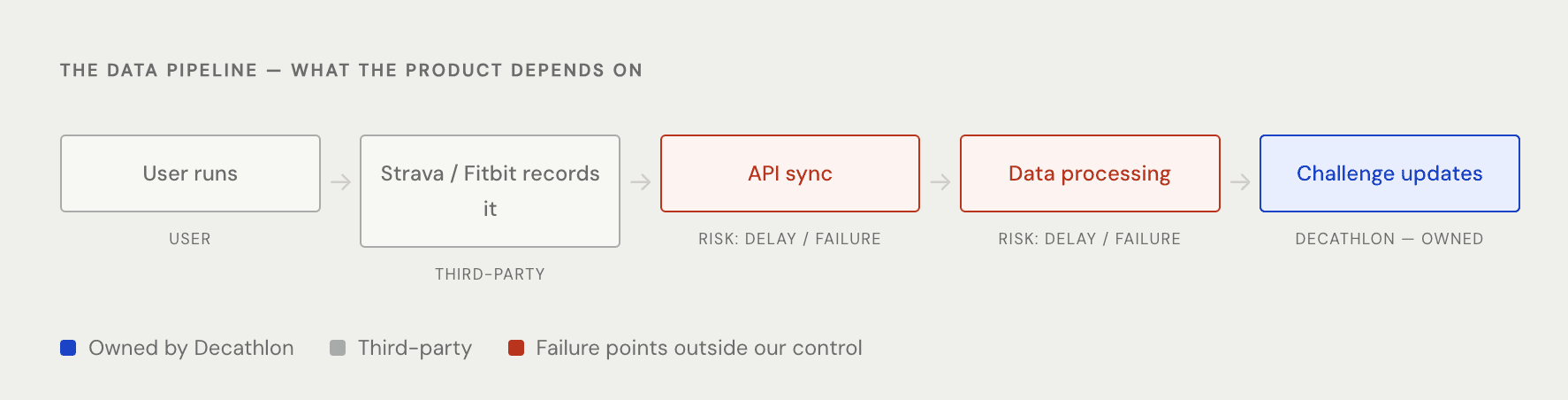
A 20-minute Strava API delay is within SLA. To a user who just finished a run and opens the app to check their rank — it's a broken product.
before investing in engineering
Building product baseline using Figma Make prototype, instead of relying on internal demos



Before writing production code, we prototyped Conversational AI in Figma Make using the OpenAI API and real datasets, and shared it with customer-facing and sales teams within 5X.
The goal was to assess purchase interest and define a clear product baseline before investing in engineering. We measured engagement depth, follow-up requests, and willingness to move toward a pilot.
early interest (pre-launch)
Existing customers enrolled in beta via Customer Success
New customers onboarded through sales-led conversations
Founder & VC engagements via pitch calls
pillars of the solution
The key principle is to design Conversations as a discovery tool, not just a query box
When working with data, trust is non-negotiable!
In early pilots, we observed not just feedback, but hesitation and uncertainty even when answers were correct. These pillars emerged from that insight.
observations from prototype
Some hesitated to act even when the results were accurate
Most prompts expressed intent, not queries
Blank input fields left users unsure of what their data could do
final designs
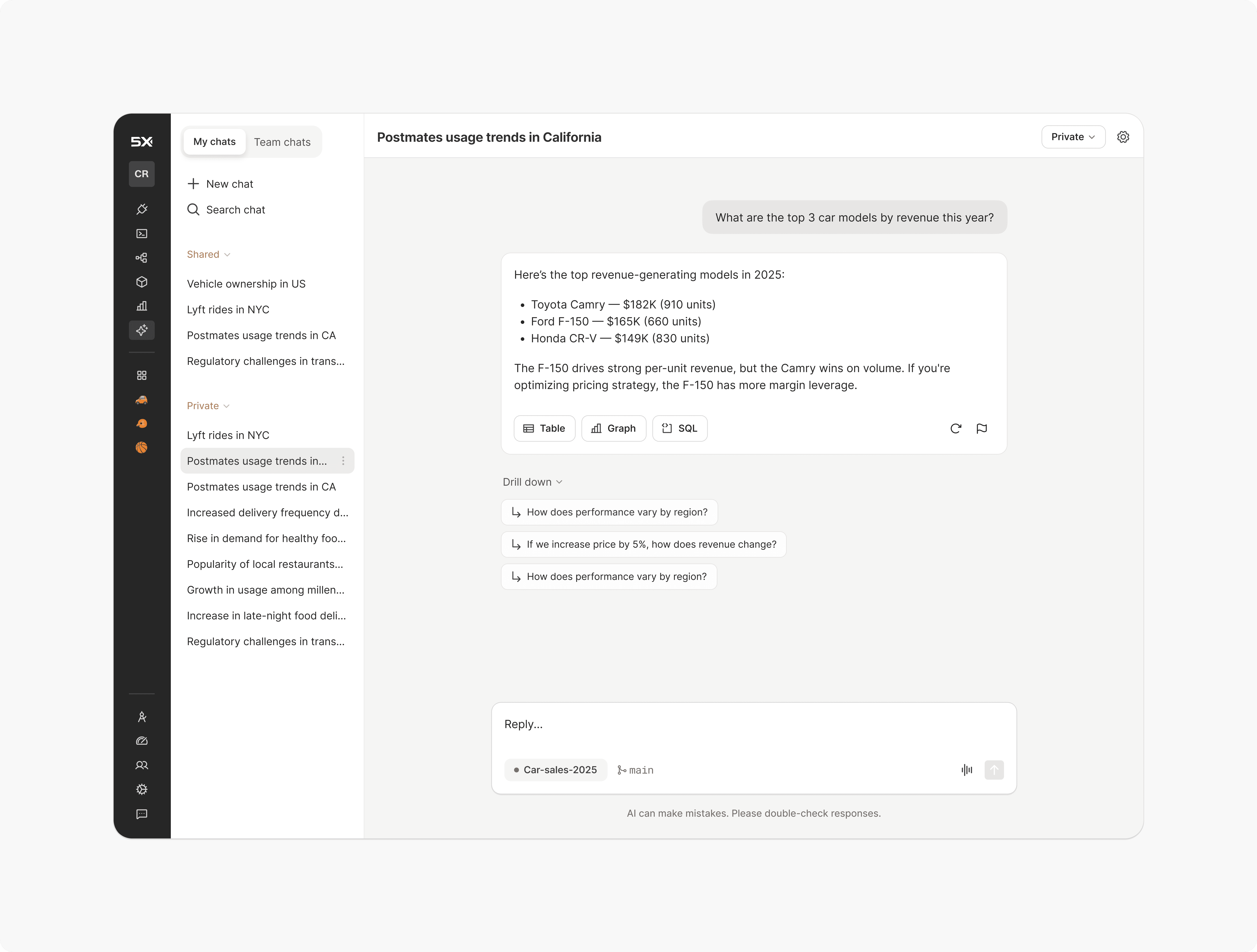
Introducing Conversational AI
Ask anything about your data based on the selected semantic repository
Each answer is a query, so the table, graph, or SQL can be extracted at the chat level
Every drill-down question surfaces a new discovery
RBAC and flagging controls for workspace visibility, keeping humans in the loop
Different thinking state for better transparency
The main challenge was that the API didn't return messages at every step, so I collaborated with devs to build a custom event system in the code to work around it
Chat experience
Breakthroughs happen within the same chat, so each bubble is its own query rather than part of a conversation!
Table, graph, or SQL can be extracted at the chat level based on the needs
Easy movement between previous chats and drill-down questions, always allowing to come back and explore more
Role-based access control (RBAC)
Chat-level sharing keeps insights accessible across the workspace for better team decisions
Direct control over workspace visibility at the chat level
Private and shared chats in separate sections
Human in loop
Flag the chat for admin or data team support when not satisfied with an answer
Chat-level flagging
Once flagged, the admin will review the flagged chat

Want to know more? Get in touch to request the case study.